For professionals whose work now expects AI

Use AI at work without pretending you already know how.

A calm, private, plain-English kit for non-technical professionals. The guide, the fill-in workbook, the copy-paste prompts, the templates, and the safety checklist that get you using AI on real desk work — no jargon, no hype, no email funnel.

See what's inside
✓ Instant access · One-time purchase · 30-day money-back guarantee
No funnel No free 7-day course No upsell Yours forever
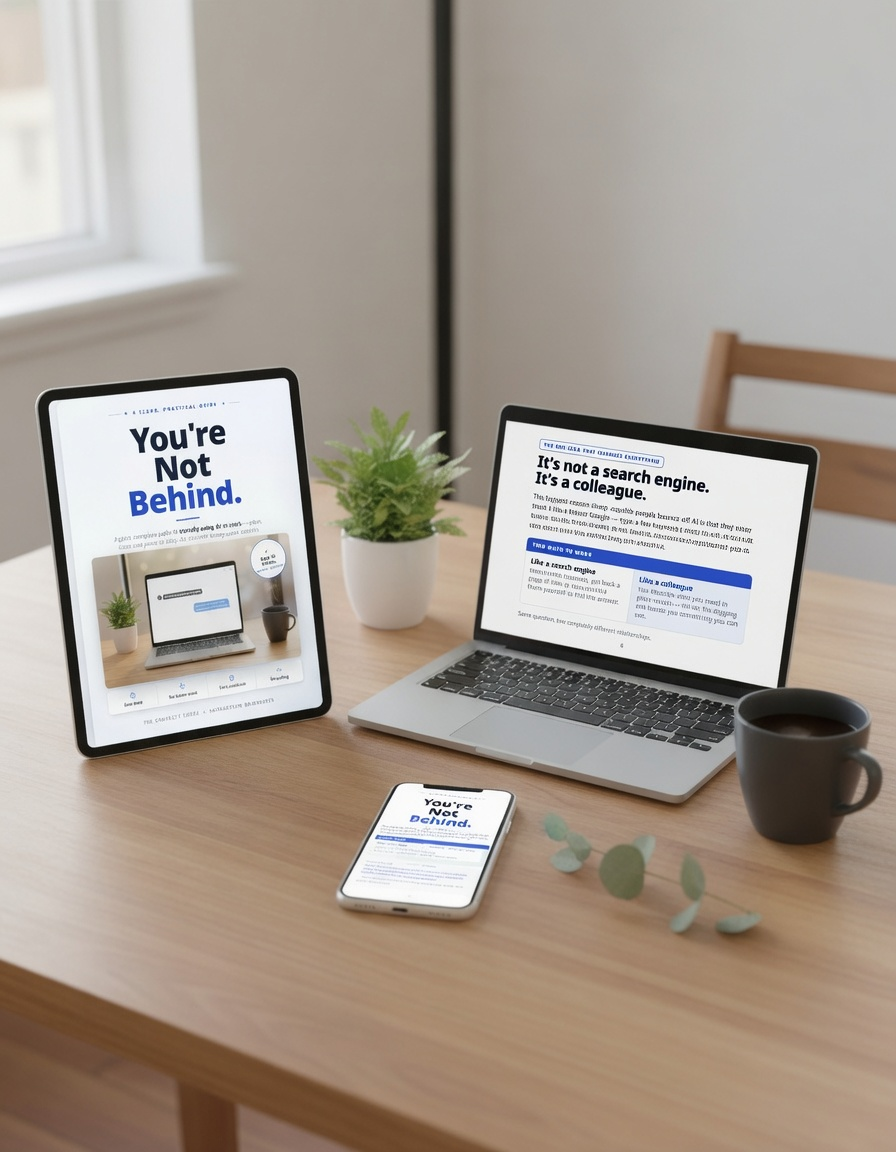
You're Not Behind — the complete AI work kit shown on a tablet, laptop, and phone: the guide, workbook, prompts, and templates
The moment it's built for

This is for the quiet moment after the meeting — not the meeting itself.

Someone said "just run it through AI." You nodded. Then you opened the tool, saw the blank box, and realized nobody had actually shown you what to type, what's unsafe to paste, or how to tell whether the answer is any good. That gap — between being expected to use AI and being shown how — is the whole thing this kit closes. Quietly, privately, on your own time.

What you'll be able to do

By the end of one weekend — 30 minutes at a time.

Do this now

Pick one low-risk task you already understand — summarizing your own notes, tidying a draft. That's your first ten minutes with the kit. Not your hardest, most sensitive work.

Inside the kit — real pages

Not claims. Actual pages you can read before you spend a cent.

No stock screenshots, no "as seen in." Real spreads from the guide and workbook, so you know exactly what you're getting.

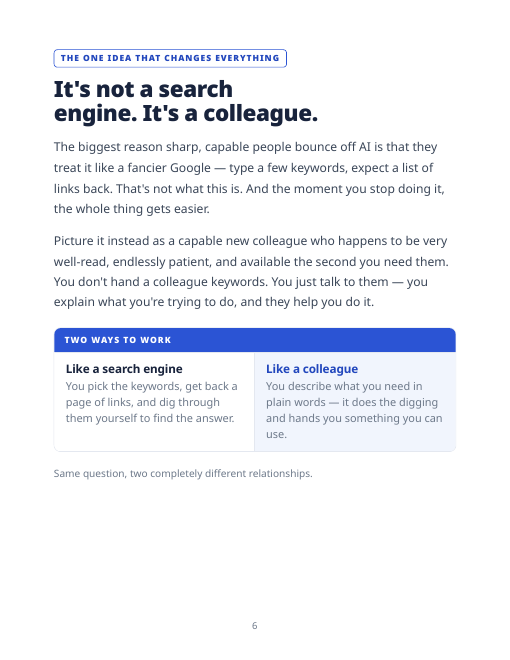
Guide page: It's not a search engine, it's a colleague
The one idea that changes everything
Stop treating it like a fancier Google. The single reframe that makes all of it easier.
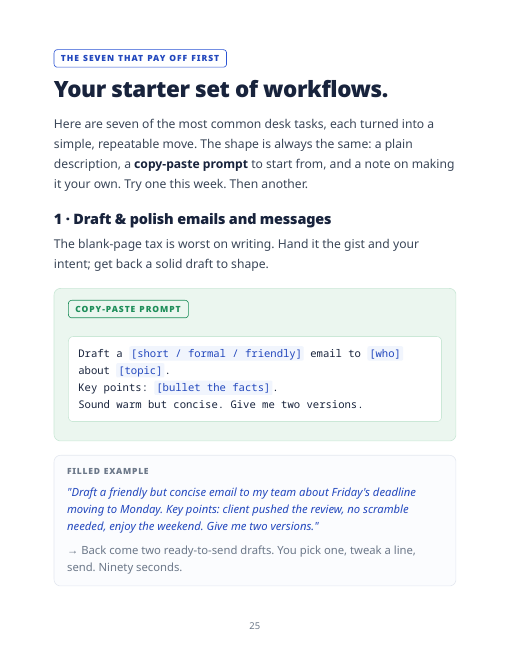
Guide page: your starter set of workflows with a copy-paste prompt
Copy-paste workflows for real desk tasks
Everyday jobs, each with a ready prompt and a filled example. Steal them today.
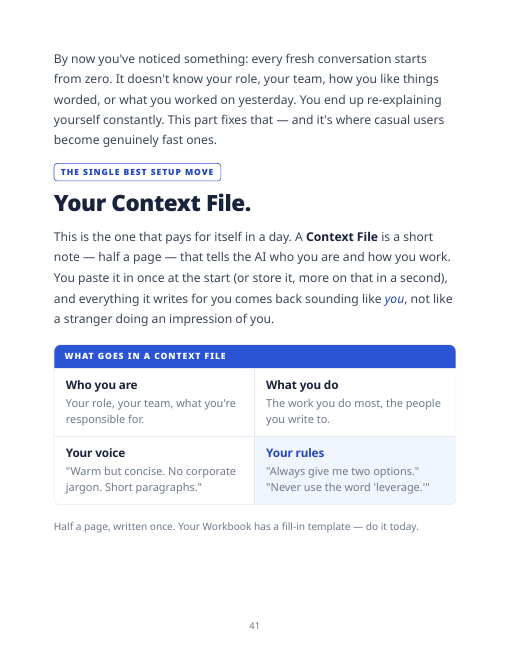
Guide page: Your Context File
Make it sound like you
The one-page "Context File" that pays for itself in a day — so AI writes in your voice.
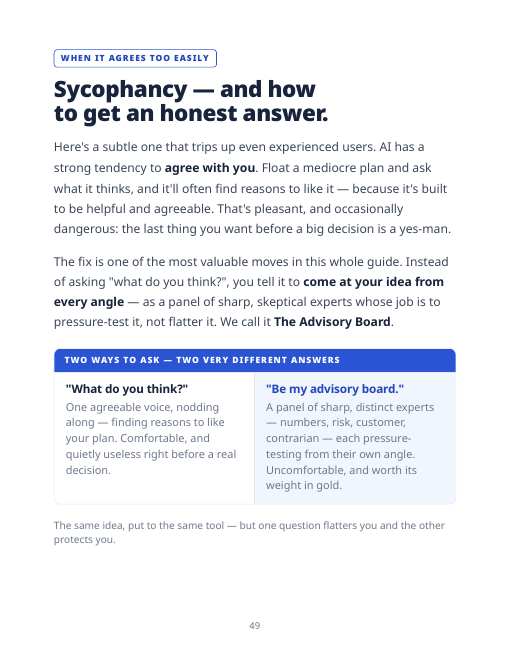
Guide page: Sycophancy and The Advisory Board prompt
Get the honest answer, not the flattering one
"The Advisory Board" prompt makes AI pressure-test your idea instead of agreeing with you.
A real prompt from the kit

One of the copy-paste prompts, exactly as it appears in the workbook — the end-of-day handoff:

Summarize where we've landed — decisions, open questions, and next steps — so I can paste this into a fresh conversation tomorrow and pick up cleanly.

64-page guide · a 10-worksheet fill-in workbook · read straight through, or jump to whatever you need.

The full contents

See everything it covers before you buy.

  1. You're not behind Why this feels harder from the outside than it is.
  2. It's a colleague, not a search engine The mental model that makes it all click.
  3. Your first five minutes From nothing to talking, in four steps.
  4. Talk to it the way you'd talk to a person No prompt engineering required.
  5. Your starter set of workflows Summarize, draft, tidy, prep — as repeatable moves.
  6. Direct it like a pro Show it what "good" looks like; react your way to great.
  7. Make it remember you Your Context File, Projects, and clean handoffs.
  8. Sessions, mistakes & getting the truth Context rot, hallucination, sycophancy — handled.
  9. The safety rules What to never paste; what it can't do.
  10. A five-minute weekly habit Stay current without the noise.
The method

Six plain steps — no technical background needed.

Built to take you from zero to confident, 30 minutes at a time. Each step is plain English and something you'll use the same week. Every chapter ends with a short "do this now" so you're never left thinking that makes sense, but what do I actually do?

1

The right mental model

It's not a search box — it's a capable colleague you talk to. Get this and the rest falls into place.

2

Just start talking

No prompt engineering. One opening line — "How can you help me with ___?" — and type the way you'd talk.

3

Workflows that save you hours

Common desk tasks turned into copy-paste moves: draft, summarize, get up to speed, prep, clean up.

4

Make it remember you

Your Context File, Projects, and handoffs — so you stop re-explaining yourself and never lose your place.

5

Work like a pro

Sessions, context rot, hallucination, and sycophancy — the real concepts that build judgment and trust.

6

Do it safely

What to never paste, where AI's limits are, and a five-minute weekly habit to stay current.

Safety rule

If you wouldn't email it to a stranger outside your company, don't paste it into an AI tool unless your employer's policy clearly allows it. An entire part of the kit is exactly this — so you use AI with peace of mind, not hoping you didn't just do something you shouldn't have with company data.

Everything in the kit

Six working parts. One weekend. Yours forever.

This isn't a book you read once. Each piece solves one specific part of "I'm expected to use AI and no one showed me how."

Guide The 64-page plain-English guide

What AI actually is, what it's good and bad at, and how to use it — without needing to learn a new profession.

→ You stop guessing what it's "supposed" to do.

Workbook The 10-worksheet fill-in workbook

Type straight into it — no copying, no setup. You build your Context File, your first workflows, and your own prompt library as you go.

→ You don't just read. You leave with a working setup.

Prompts The copy-paste prompt library

Ready-to-use prompts for real office tasks: summarizing, drafting, rewriting, planning, prepping, comparing — each with a filled example.

→ You're never stuck staring at the blank prompt box.

Template The Context File template

A simple fill-in doc that teaches AI your role, tone, and recurring work — so its answers stop sounding generic.

→ AI starts sounding like a competent assistant who gets your desk.

Prompt The Advisory Board prompt

A structured prompt that asks AI for real pushback, risks, and alternatives — not flattering agreement.

→ Clearer thinking before you send or decide.

Checklist The AI safety checklist

A practical guardrail for what not to paste, when to anonymize, and how to check your employer's policy in two minutes.

→ You use AI without being careless with work information.

Why $79.99?

Because it isn't priced as "a PDF." It's a complete kit — the explanation, the practice, the prompts, the templates, and the safety guardrails in one place — that's less than a single hour with an AI consultant, except you own every piece forever and reuse it on every new task. You sit down this weekend, open one file, and start using AI on real work. No course to join, no funnel, no subscription.

The complete kit
You're Not Behind
The Private AI Work Kit for Professionals
$79.99
One-time. No subscription. Yours to keep forever.
WHAT HAPPENS WHEN YOU CLICK
  • You go to a secure Gumroad checkout ($79.99).
  • You get instant access to all six parts — download immediately.
  • One-time purchase. No subscription, no upsell, no email sequence.
  • Covered by the 30-day money-back guarantee below.
  • The Guide — 64 pages, PDF, plain-English and calm
  • The Workbook — 10 fill-in worksheets you actually use
  • The Copy-Paste Prompt Library — for your core work tasks
  • The Context File template — so AI sounds like you
  • The Advisory Board prompt — honest pressure-testing, not flattery
  • The AI Safety Checklist — what to never paste at work
Secure checkout · Instant digital delivery · 30-day guarantee
30-Day Money-Back Guarantee

Use it on your actual work. If it doesn't help, you don't pay.

Get the kit. Read the guide, and try at least three of the workflows on your real tasks. If you don't feel more capable and calmer about using AI at work than you were before — email us within 30 days and we'll refund you in full. No forms, no hoops, no guilt, and no attempt to talk you out of it.

A digital product should still have to earn your trust. This one does.

Straight about fit

Who this is for — and who it isn't.

This is for you if…

  • You're a capable professional whose work now expects AI, and no one trained you.
  • You want to use it competently and privately, without announcing you're starting from zero.
  • You'd rather own one complete thing than get funneled into another email course.

This is not for…

  • Engineers, AI hobbyists, or people building automations and agents.
  • Managers rolling AI out across a company (this is a personal kit).
  • Anyone after income claims, side-hustles, or guru tactics.
Our standards

No fake testimonials or star ratings. No exaggerated claims. No "secret prompt" hype. No advice to paste sensitive work data. No funnel after purchase. We show you real pages and give you a real guarantee instead.

Why now

No countdown. No fake deadline. Just where work already is.

AI is already showing up in your meetings, your tools, your job description, and casual comments like "just use AI for that." Waiting doesn't make the topic smaller — it usually makes it more awkward to ask a basic question later. Give yourself one quiet weekend now, before another month goes by with it sitting on your to-learn list.

✓ 30-day money-back guarantee
Straight answers

The questions worth naming.

Is this just a PDF?

No. The guide explains the ideas, but the workbook, prompt library, Context File template, Advisory Board prompt, and safety checklist are the working parts. It's built to be used at your desk, not read once and shelved. The previews above are real pages from it.

Will it work with the AI tool my employer uses?

The method and prompts are written for common workplace AI assistants — ChatGPT, Claude, Gemini, and Copilot-style tools. Some buttons differ, but the core approach is the same across all of them.

Do I need to be technical?

No. Not even a little. There's no code, no setup, and nothing assumed. It's written for an intelligent professional who simply hasn't used this one tool yet — explained plainly because it genuinely is simple, never because we think you can't keep up.

Is using AI at work even safe — or allowed?

An entire part of the kit is exactly this: what to never paste, work-account vs. personal-account, and how to check your company's policy in two minutes. You'll use AI carefully, not hoping you didn't just do something you shouldn't have with company data.

What if I buy it and it's not useful for me?

Then ask for a refund within 30 days and we'll return your money in full — no forms, no questions. We'd rather refund you than have this feel like another AI purchase you regret.

Why are there no reviews?

It's a new product, and we don't fabricate reviews, ratings, or customer counts. Instead we show real pages, a real prompt, the full contents, and back it with a 30-day guarantee. When we have real, verified buyer reviews, you'll see them here — clearly labeled.
A note from the person who made this

I built this after watching capable, accomplished people — people who are excellent at their actual jobs — get handed nothing but hype or homework when AI landed on their desk.

So this is the kit I wish they'd been given: plain, complete, honest, and finite. We're deliberately not a personality to follow — the focus is the method, not the maker. No funnel, no free "course" that's really an ad, no upsell a few pages in. You buy it, you own it, and it does exactly what it says.

— HollAndHarbor

$79.9930-day guarantee